Our Short List of 3
All 4 Picks at a Glance
| Product | Specs | Action |
|---|---|---|
 HP Spectre x360 14: the most capable convertible here | Check price on Amazon | |
 Lenovo Yoga 7i 2-in-1: pen included, graphics a step up | Check price on Amazon | |
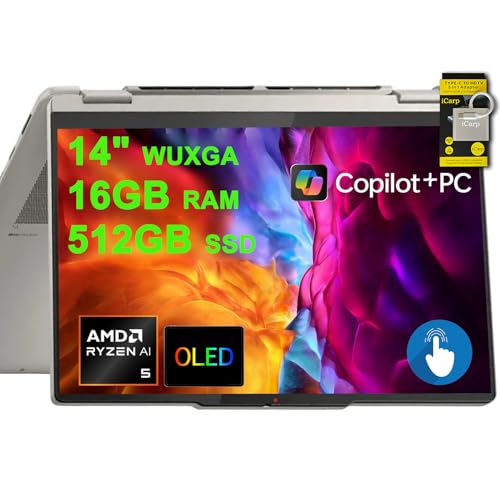 Lenovo Yoga 7 2-in-1: the AMD alternative | Check price on Amazon | |
 HP Envy x360 14: the value convertible | Check price on Amazon |
Key takeaways
- The best touch screen laptops for mechanical engineering students: HP Spectre x360, Lenovo Yoga 7i and Yoga 7, and HP Envy x360 compared for CAD and coursework.
A mechanical engineering degree asks a laptop to do two jobs that pull in opposite directions. In lectures and study sessions it is a note-taking machine, where a touch screen and pen let you sketch free-body diagrams, annotate slides and mark up drawings directly on the display. In the lab and the dorm it is a CAD workstation, expected to run SolidWorks, Autodesk Fusion, Inventor or AutoCAD smoothly, chew through MATLAB scripts, and open assemblies without stalling. The four convertible laptops in this guide are currently sold on Amazon US and balance those two jobs: each one folds into tablet mode with pen support, and each one carries the processor, memory and storage that student engineering work actually needs.
One honest boundary before the picks: professional engineering workstations with certified graphics drivers are a separate, heavier and more expensive class of machine, and none of these convertibles is one. For coursework — parts, moderate assemblies, coursework-level simulation and rendering — the integrated graphics in these laptops are genuinely capable. Students heading into very large assemblies or heavy finite-element work should treat the 32 GB pick below as the floor, and expect to use university lab machines for the biggest jobs.
What to prioritise
Memory and processor over screen flair
CAD software rewards memory first. Sixteen gigabytes is the working minimum for student CAD; thirty-two gigabytes gives assemblies and simulation room to breathe and keeps the machine useful into the final year. All four processors here are modern multi-core chips from Intel’s Core Ultra or Core lines or AMD’s Ryzen AI series, each with integrated graphics strong enough for student modelling.
The pen and the hinge
For note-taking, the pen matters as much as the touch screen. The Lenovo picks below include or support an active pen for sketching and annotation, and the HP models support HP’s active pen line. A 360-degree hinge lets the machine sit flat as a tablet for reading drawings, tent on a desk for group work, or fold back during presentations.
Display and portability
Engineering students carry their laptop all day, so every pick here is a 14-inch machine around the three-pound mark. OLED panels on three of the four give precise colour and deep contrast that make drawings and renders easy to read; the fourth trades OLED for a lower-cost IPS panel. Battery capacity and charging speed matter on long lab days, and all four charge over USB-C.
What the coursework actually loads
First-year work is mostly documents, spreadsheets, programming and introductory modelling, which any of these machines handles easily. The load grows in the middle years: parametric CAD parts become assemblies, MATLAB scripts become simulations, and courses add finite-element analysis, computational fluid dynamics introductions and rendering for design projects. Final-year project work is the peak, when a large assembly, a simulation and a report compete for memory at once. That progression is why memory headroom matters more than a small difference in processor speed, and why the 32 GB Spectre below is positioned as the four-year machine.
Building a desk setup around a convertible
A 14-inch screen is right for lectures and tight for CAD, so most engineering students end up adding a monitor at their desk. All four machines drive an external display over USB-C or HDMI, and a single USB-C dock or hub can connect the monitor, keyboard, mouse and charger with one plug when you sit down. The convertible hinge earns its keep here too: folded flat or tented beside the monitor, the laptop becomes a second screen for drawings, datasheets and lecture recordings while the main display holds the model. Budget for the dock and monitor alongside the laptop; the combination is worth more than a small step up in processor.
Software licencing works in your favour
Most of the professional software named in this guide is available to enrolled students at no cost or through the university: Autodesk provides education licences for Fusion, AutoCAD and Inventor, MATLAB is commonly covered by a campus licence, and SolidWorks is frequently provided through engineering departments for coursework machines. That means the laptop budget does not need to stretch to software, but it does mean the machine must meet each program’s published system requirements — another reason the memory figures in the picks below matter. Install the heavy packages before term starts and confirm they activate under the campus licence while you still have time to change hardware if a requirement is missed.
The picks
HP Spectre x360 14: the most capable convertible here
The HP Spectre x360 14 (ASIN B0DM576K21) is the strongest engineering pick in this guide. Its Intel Core Ultra 7 155H processor is paired with 32 GB of memory and a 2 TB solid state drive, the largest memory and storage combination here, which is exactly what growing CAD assemblies, simulation files and a final-year project library consume. The 14-inch OLED touch display runs at 2880 by 1800 resolution with a 120 Hz refresh rate, so models and drawings stay sharp and panning a viewport feels smooth.
The convertible hinge and active pen support cover the lecture-hall side of the job: sketching mechanisms, annotating thermodynamics problems and marking up PDFs all happen directly on the screen. Build quality is the best in this guide, with an aluminium body that shrugs off daily bag duty. For a student who can stretch to one machine for the whole degree, this is the one to build around.
Lenovo Yoga 7i 2-in-1: pen included, graphics a step up
The Lenovo Yoga 7i 2-in-1 (ASIN B0FQ364776) pairs an Intel Core Ultra 5 226V processor with 16 GB of memory and a 1 TB drive. Its Intel Arc 140V integrated graphics are a genuine step above basic integrated graphics, which shows up as smoother viewport movement in CAD and better behaviour in light rendering. The 14-inch WUXGA OLED touch display covers the full DCI-P3 colour range, and the Yoga Pen is included in the box, so the note-taking setup works from day one without an extra purchase.
At roughly three pounds with a 70 Wh battery and rapid charging, it suits the all-day campus routine, and the port mix — two Thunderbolt 4, USB-A, HDMI and a microSD reader — connects lab peripherals and external displays without a pocketful of adapters. It is the most balanced pick here for a student whose coursework mixes CAD with heavy note-taking.
Lenovo Yoga 7 2-in-1: the AMD alternative
The Lenovo Yoga 7 2-in-1 (ASIN B0FM3WJP79) is the AMD-powered sibling, built on a Ryzen AI 5 340 processor with 16 GB of memory and a 512 GB drive. The 14-inch WUXGA OLED touch display matches the Yoga 7i’s panel quality, and the same convertible design and pen support cover sketching and annotation work.
The smaller drive is the main compromise: CAD libraries and virtual machine images fill 512 GB faster than students expect, so budget for external storage or choose coursework files carefully. In exchange, the Ryzen platform delivers strong multi-core performance for MATLAB and compiling work and typically keen value. Students who prefer AMD, or who find this configuration priced within reach when the others are not, give up little that matters for coursework.
HP Envy x360 14: the value convertible
The HP Envy x360 14 (ASIN B0CW1MRFV7) brings the same formula in at the accessible end of this guide: a 13th-generation Intel Core i7 processor, 16 GB of memory and a 1 TB drive behind a 14-inch full HD IPS touch display. The processor generation is a step behind the Core Ultra models, but for student CAD, programming and coursework it remains a capable combination, and the generous drive matches the Yoga 7i’s.
The IPS panel gives up the OLED models’ contrast and colour depth, and the screen is less bright, which matters in sunlit rooms. Against that, you get the full convertible experience — tent and tablet modes, pen support, backlit keyboard and fingerprint reader — in a machine that leaves budget room for a monitor, mouse and the other peripherals a study desk accumulates. One detail to verify: listings for this model have described the exact Core i7 variant inconsistently, so confirm the precise processor on the product page before ordering if that detail matters to you.
Battery life and carrying it all day
Convertibles in this class generally cover a day of lectures, note-taking and light modelling between charges, with the OLED models using more power at high brightness than the IPS-equipped Envy. Heavy CAD and simulation work drains any laptop quickly, so lab benches and library desks with power outlets remain part of the routine regardless of the machine. All four charge over USB-C, which means one compact charger can serve the laptop and a phone, and a charger left in the bag removes the daily decision about whether to carry one. Weight differences among the four are small; the pen, charger and a mouse will add as much to your bag as the gap between the lightest and heaviest laptop here.
Choosing for your degree
If the budget stretches to one machine for four years, the Spectre x360’s memory and storage make it the safest long-term bet. The Yoga 7i is the balanced all-rounder with the pen in the box and the strongest integrated graphics of the 16 GB group. The Yoga 7 covers the same ground on AMD with a smaller drive, and the Envy x360 is the sensible value route into a pen-equipped convertible. Whichever you choose, confirm the memory and storage figures in the listing title before ordering — each of these models is sold in several configurations under separate listings, and CAD work punishes a configuration chosen by mistake.
Two ownership details are worth settling in the first week. Register the warranty and check its length, since student budgets rarely absorb a mainboard failure in year three, and set up automated backups of your coursework folders to cloud storage or an external drive — a lost final-year project is a far worse outcome than a lost laptop. Finally, buy a sleeve or padded case before the semester starts; convertibles live in backpacks alongside chargers, water bottles and textbooks, and the touch screen that makes these machines useful is also the part most exposed to that daily treatment.
Disclosure: As an Amazon Associate, this site may earn from qualifying purchases made through links in this article, at no additional cost to you.