Key takeaways
- Find the best replacement battery for MacBook Pro 13 2010. Compare A1322 batteries by capacity, voltage, fit, and warranty, and pick the right pack today.
If your Mid 2010 MacBook Pro 13-inch shuts down at half charge, swells, or barely lasts an hour away from the wall, the best replacement battery for macbook pro 13 2010 is a new A1322 lithium-polymer battery rated at 10.95V and around 63.5Wh. The original battery in these machines is now well past its useful life, and a fresh A1322 cell pack is the single most effective way to make the laptop portable again. This guide compares the strongest A1322 replacement batteries still sold on Amazon US, explains how to confirm the fit for your exact machine, and walks through installation and calibration so you get the most from the new pack.
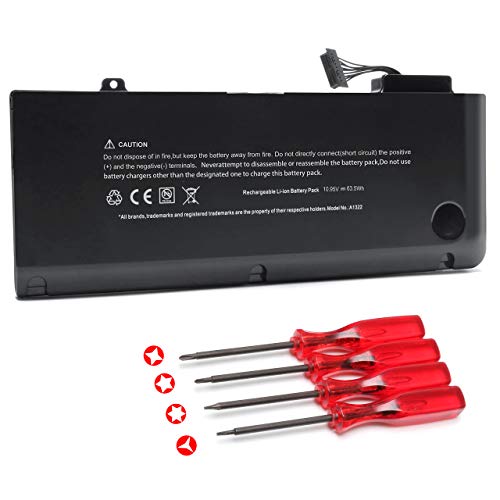

The short answer is simple: buy a battery that is explicitly listed for the A1322 part number and the MacBook Pro 13-inch A1278 unibody models from Mid 2009 through Mid 2012, with a 10.95V rating and a capacity of 63.5Wh or higher. Match the voltage exactly, confirm the connector and screw layout match the original, and choose a seller that offers a clear warranty and return window.
Quick Picks
| Battery | Capacity | Voltage | Best For |
|---|---|---|---|
| A1322 A1278 Replacement Battery (63.5Wh) | 63.5Wh | 10.95V | Closest match to the original Apple spec |
| Wistar A1322 A1278 Battery | 63.5Wh | 10.95V | Included screwdriver and straightforward install |
| NENO TECH A1322 A1278 Battery | 6000mAh | 10.95V | Higher milliamp-hour rating for longer runtime |
| A1322 Battery for MacBook Pro 13-inch (65.7Wh) | 65.7Wh | 10.95V | Slightly larger capacity than stock |
| A1322 A1278 Laptop Battery (63.5Wh) | 63.5Wh | 10.95V | Budget-friendly direct replacement |
How to Choose
Choosing a replacement battery for a laptop that is more than fifteen years old is mostly about fit and safety. The cells themselves are simple, but a battery with the wrong voltage, the wrong connector, or a sloppy build can damage the machine or fail within weeks. Work through the points below before ordering.
Confirm the A1322 Part Number
The Mid 2010 MacBook Pro 13-inch uses the A1322 battery, which is also the part fitted to the A1278 unibody models from Mid 2009 through Mid 2012. Before buying, check the model number printed on the bottom case of your laptop, which should read A1278, and check the part number on your existing battery, which should read A1322. If your machine is a 15-inch or 17-inch MacBook Pro from the same era, it uses a different battery entirely, and an A1322 pack will not fit. The part number matters more than the screen size alone, so always verify both numbers.
Match the Voltage Exactly
The original A1322 battery is rated at 10.95V, and every replacement you consider should carry the same rating. Voltage is not a specification where close is good enough. A battery rated noticeably higher or lower than 10.95V can cause charging problems, unexpected shutdowns, or heat buildup, and it may not be recognized by the MacBook at all. Capacity, measured in watt-hours or milliamp-hours, is the number that can vary: a pack rated at 63.5Wh matches the original, while packs rated at 65.7Wh or 6000mAh offer a little more runtime. Treat voltage as fixed and capacity as flexible.
Check Capacity and Cell Count
Capacity determines how long the laptop runs on a charge. The original A1322 battery holds 63.5Wh, which Apple rated at roughly 5800mAh. Most quality replacements match that figure, and some offer 6000mAh or 65.7Wh, which translates into a modest increase in runtime under the same workload. Be cautious of listings that claim dramatically higher capacity than the original in the same physical shell, since the battery bay has a fixed size. A realistic capacity figure, a stated cell count, and a lithium-polymer chemistry are the marks of an honest listing.
Look for Safety Certifications
A laptop battery is a high-energy component, and its protection circuitry matters as much as its cells. Look for batteries that list CE, RoHS, and FCC certification, and for listings that mention built-in protection against overcharging, over-discharging, short circuits, and overheating. These certifications do not guarantee perfection, but their absence is a warning sign. A reputable seller will state the certifications plainly in the product description rather than hiding them. If a listing makes no mention of safety testing or protection circuitry, keep looking.
Consider Tools and Installation Support
Replacing the A1322 battery is a straightforward job that takes most people fifteen to thirty minutes, but it does require the right screwdrivers. The battery is held in place by small tri-wing screws, and the bottom case uses pentalobe screws, so a standard Phillips driver will not do the job. Several of the batteries in this guide ship with the necessary screwdrivers included. If your chosen battery does not include tools, budget for a small MacBook repair kit before you start.
Check the Warranty and Return Policy
Because these are third-party batteries for a vintage machine, the warranty is your main safety net. A twelve-month warranty is the standard to look for, and a thirty-day return window is a reasonable minimum. Read the warranty terms before ordering: some sellers cover only manufacturing defects, while others offer replacement for early capacity loss. Keep your order confirmation and the original packaging until the battery has been through several full charge cycles, so a return is still possible if the pack turns out to be faulty.
Read the Compatibility List Carefully
A1322 batteries are sold for a family of machines, and the compatibility list in each listing usually names the MacBook Pro 13-inch models from Mid 2009, Mid 2010, Early 2011, Late 2011, and Mid 2012, along with part numbers such as 661-5229 and 661-5557. Confirm that Mid 2010 appears on the list and that the A1278 model identifier is named. Note that the A1322 battery is not compatible with the 2008 A1278 MacBook Pro, which used a removable battery, nor with any Retina MacBook Pro. If your exact model identifier, such as MacBookPro7,1 for the Mid 2010 13-inch, is not listed, contact the seller before ordering.
The Best best replacement battery for macbook pro 13 2010 Reviewed
The five batteries below are all A1322 replacements sold on Amazon US for the MacBook Pro 13-inch unibody family, including the Mid 2010 model. Each one is a lithium-polymer pack rated at 10.95V, and each one is reviewed on its own merits so you can match the right pack to your priorities.
A1322 A1278 Replacement Battery (63.5Wh)
This is the most direct replacement for the original Apple battery, matching the stock specification of 63.5Wh at 10.95V. It is built for the MacBook Pro 13-inch A1278 models from Mid 2009 through Mid 2012, including the Mid 2010 machine, and it uses the same connector and screw layout as the original pack, so installation is a straight swap with no modification. The lithium-polymer cells are rated for hundreds of charge cycles, which is in line with what the original battery delivered when new. This is the pick to choose when you want the closest possible match to the battery Apple shipped in the machine, without paying for extra capacity you may not need. It suits everyday use such as web browsing, word processing, and media playback, and it restores the portability that makes the old MacBook useful again.
- Capacity: 63.5Wh
- Voltage: 10.95V
- Compatibility: MacBook Pro 13-inch A1278, Mid 2009 to Mid 2012, including Mid 2010
- Check on Amazon: Check on Amazon
Wistar A1322 A1278 Battery
The Wistar A1322 battery is a 63.5Wh lithium-polymer pack rated at 10.95V, built around six cells and rated for up to 500 recharge cycles. It is listed for the MacBook Pro 13-inch Mid 2009, Mid 2010, Early 2011, Late 2011, and Mid 2012 models, covering part numbers 661-5229 and 661-5557. What sets this one apart is the installation experience: it ships with a free screwdriver, and the listing includes clear compatibility guidance, which makes it a good choice if this is your first time opening a MacBook. The six-cell design spreads the load across more cells than some three-cell alternatives, which can help with longevity over many charge cycles. If you value a smooth first install and a battery from a brand with a visible track record in MacBook replacements, the Wistar is a strong candidate.
- Capacity: 63.5Wh
- Voltage: 10.95V
- Compatibility: MacBook Pro 13-inch A1278, Mid 2009 to Mid 2012, including Mid 2010
- Check on Amazon: Check on Amazon
NENO TECH A1322 A1278 Battery
The NENO TECH A1322 battery stands out on capacity, offering 6000mAh at 10.95V, which is a step up from the original 5800mAh rating and should deliver slightly longer runtime between charges. It is engineered for the A1322 and A1278 models, with a plug-and-play design that matches the original connector and mounting points. The higher milliamp-hour figure makes this the pick for users who run their MacBook away from a charger for long stretches, such as students or anyone using the machine as a portable writing or media station. As with any higher-capacity claim, the real-world gain depends on the condition of the rest of the machine, including the health of the logic board and the efficiency of the operating system, but the capacity advantage is genuine on paper and worth having if runtime is your priority.
- Capacity: 6000mAh
- Voltage: 10.95V
- Compatibility: MacBook Pro 13-inch A1278, Mid 2009 to Mid 2012, including Mid 2010
- Check on Amazon: Check on Amazon
A1322 Battery for MacBook Pro 13-inch (65.7Wh)
This A1322 replacement offers 65.7Wh at 10.95V, with a 6000mAh rating that edges past the original 63.5Wh specification. It is listed for the MacBook Pro 13-inch Mid 2009, Mid 2010, Early 2011, Late 2011, and Mid 2012 models, and it is built as a direct replacement with the same six-cell lithium-polymer construction as the original. The extra watt-hours translate into a modest runtime gain, which is useful if your Mid 2010 MacBook still serves as a daily machine. This battery is also a good option if your original pack has swollen, since a fresh pack with a proper fit restores the correct pressure on the trackpad and bottom case. Confirm the part number on your old battery before ordering, and keep the included documentation for the warranty period.
- Capacity: 65.7Wh (6000mAh)
- Voltage: 10.95V
- Compatibility: MacBook Pro 13-inch A1278, Mid 2009 to Mid 2012, including Mid 2010
- Check on Amazon: Check on Amazon
A1322 A1278 Laptop Battery (63.5Wh)
The final pick is a straightforward 63.5Wh lithium-polymer battery rated at 10.95V, built for the MacBook Pro 13-inch A1278 models from Mid 2009 through Mid 2012. It matches the original Apple specification exactly, which makes it the simplest choice when you want a no-surprises replacement at the lowest end of the range. The listing covers the Mid 2010 model explicitly, along with the 661-5229 and 661-5557 part numbers, so fit is not a guessing game. This battery is best suited to light and moderate use, such as keeping an old MacBook running as a secondary machine, a media player, or a backup computer. Pair it with a fresh install of a lightweight operating system and the Mid 2010 MacBook Pro can remain genuinely useful for years to come.
- Capacity: 63.5Wh
- Voltage: 10.95V
- Compatibility: MacBook Pro 13-inch A1278, Mid 2009 to Mid 2012, including Mid 2010
- Check on Amazon: Check on Amazon
What to Check Before You Buy
Before you place an order, run through this short checklist so the battery you receive is the battery your MacBook needs. First, confirm your machine is the Mid 2010 MacBook Pro 13-inch by opening the Apple menu and choosing About This Mac, then checking the model identifier, which should read MacBookPro7,1. Second, check the part number on your existing battery, which should read A1322, and note the voltage and watt-hour rating printed on its label. Third, inspect the old battery for swelling: if the bottom case is bulging or the trackpad clicks oddly, the battery may be swollen, and you should handle it carefully and recycle it properly rather than puncturing it or throwing it in the trash.
Fourth, compare the connector in the listing photos with your existing battery. The A1322 uses a small multi-pin connector on a short cable, and a listing that shows a different connector shape is a sign the battery is built for another model. Fifth, check that the seller ships to your address and that the return window is long enough to test the battery through several full charge cycles. Sixth, gather the tools you will need: a pentalobe screwdriver for the bottom case and a tri-wing screwdriver for the battery screws, unless your chosen battery includes them. Finally, plan the calibration step. After installing a new battery, charge it fully, then let the MacBook run on battery until it sleeps from low charge, then charge it fully again.
A note on fit: every battery in this guide is built for the whole A1278 unibody family from Mid 2009 through Mid 2012, not for the Mid 2010 model alone. That is normal for A1322 replacements, since Apple used the same battery across those model years. It is not a partial fit, but double-check that your machine is one of the listed models. The 2008 model, the Retina models, and the 15-inch and 17-inch models all use different batteries.
FAQ
How do I know my Mid 2010 MacBook Pro needs a new battery?
The clearest signs are short runtime, sudden shutdowns while the charge indicator still shows power remaining, and a battery status of Service Battery or Replace Soon in macOS. You can check the cycle count and condition by holding the Option key, opening the Apple menu, choosing System Information, and selecting Power. A cycle count well above 500, combined with a condition warning, means the battery is at the end of its life. Physical swelling, a trackpad that feels raised, or a bottom case that no longer sits flat are also signs that the battery should be replaced promptly.
Is the A1322 battery the same as the A1278 battery?
The two numbers describe different things. A1278 is the model number of the MacBook Pro 13-inch unibody family, while A1322 is the part number of the battery that fits those machines. When a listing says A1322 A1278, it means the battery part number is A1322 and it fits the A1278 laptop models. Both numbers should appear in the listing for your Mid 2010 machine, and matching the A1322 part number is the key check.
Can I install an A1322 battery myself?
Yes, for most people this is a manageable DIY job. You remove the bottom case, disconnect the old battery connector, remove the tri-wing screws, lift the old battery out, and reverse the process with the new pack. The job usually takes fifteen to thirty minutes, and many batteries ship with the screwdrivers included. If you are not comfortable working inside a laptop, a local repair shop can usually do the swap for a modest labor fee, and it is still far cheaper than replacing the machine.
How long will a new A1322 battery last?
A new lithium-polymer A1322 battery is typically rated for around 500 full charge cycles before its capacity drops noticeably, which matches the original Apple specification. In practice, that means several years of regular use, depending on how often the laptop runs on battery and how it is stored. To get the most from the new pack, avoid leaving the MacBook plugged in at full charge for weeks at a time, keep it away from extreme heat, and let it run through a full discharge and recharge every month or so.
Does a higher-capacity A1322 battery harm the MacBook?
No, a higher capacity at the same voltage is safe. Capacity, measured in watt-hours or milliamp-hours, only determines how much energy the battery stores, while voltage determines the electrical pressure the laptop receives. A 65.7Wh or 6000mAh pack at 10.95V delivers the same voltage as the original 63.5Wh pack and simply runs a little longer. What matters is that the voltage matches exactly and the physical dimensions and connector are correct, so the battery fits and charges properly.
Bottom Line
The best replacement battery for macbook pro 13 2010 is any well-built A1322 pack rated at 10.95V with a capacity of 63.5Wh or better, sold by a vendor that states its safety certifications and offers a twelve-month warranty. For the closest match to the original specification, the 63.5Wh A1322 A1278 replacement battery is the natural first choice. If you want the easiest install, the Wistar pack with its included screwdriver is hard to beat. And if maximum runtime matters most, the higher-capacity NENO TECH and 65.7Wh options give you a little extra time away from the charger. Whichever you choose, confirm the A1322 part number, match the voltage, and calibrate the new pack after installation, and your Mid 2010 MacBook Pro will be portable again.
Disclosure: As an Amazon Associate, we may earn from qualifying purchases.