Key takeaways
- Find the best battery replacement for ASUS N56JR laptops. Compare A32-N56 fitment, capacity, voltage, safety features, and installation tips before you buy.
Introduction
The best battery replacement for ASUS N56JR laptops is a 10.8V lithium-ion pack rated at 56Wh (5200mAh) that replaces part numbers A32-N56, A31-N56, A33-N56, or A32-N46. That combination matches the original battery fitted to the N56JR, so the pack slots into the same compartment, uses the same connector, and is recognised by the laptop without modification. If your N56JR now lasts only a short while away from the wall, shuts down without warning, or reports a worn battery in Windows, a fresh pack built to those specifications is the straightforward fix.
Quick answer: choose the A32-N56 56Wh replacement battery below. It lists the N56JR by name among its compatible models, carries CE, FCC, and RoHS certification, and is backed by a 12-month warranty. Before ordering any replacement, check the label on your original battery and confirm that its part number is one of A31-N56, A32-N56, A33-N56, or A32-N46, and that the voltage reads 10.8V or 11.1V. Those two checks prevent almost every fitment mistake with this model.
This guide explains how to match a battery to the N56JR, what the specifications mean in everyday use, how to install the new pack safely, and how to look after it so it holds its charge for as long as possible.
Quick Picks
| Pick | Battery | Voltage | Capacity | Replaces | Best For |
|---|---|---|---|---|---|
| Top Pick | A32-N56 56Wh Replacement Battery (N46V / N56V / N76V Series) | 10.8V | 56Wh (5200mAh) | A31-N56, A32-N56, A33-N56, A32-N46 | Direct N56JR fit with full original capacity |
How to Choose
Match the Part Number First
The single most important check is the part number printed on your original battery. The ASUS N56JR shipped with batteries labelled A32-N56, and the interchangeable family includes A31-N56, A33-N56, and A32-N46. A replacement that lists one of those four numbers is built for the same housing and connector. Remove the battery from the laptop, read the label under good light, and write the number down before you shop. If the label is worn, the model number on the laptop base and the battery compartment shape are useful secondary clues, but the part number remains the surest match. Never rely on the laptop model name alone, because ASUS sold several N56 variants, and a battery shaped for a different series may look similar while fitting poorly or not at all.
Get the Voltage Right
The N56JR replacement battery should be rated at 10.8V, with 11.1V packs also sold as compatible with the same part-number family. Both figures describe the same six-cell lithium-ion configuration, and the small nominal difference comes from how manufacturers state cell voltage. What matters is staying within that range: a pack rated far above or below it is the wrong battery, even if the shape looks right. Voltage is printed on the battery label next to the capacity, so compare the two labels side by side. Matching voltage protects the charging circuit and keeps the laptop reading the battery level correctly.
Understand Capacity: Wh and mAh
Capacity is shown in watt-hours (Wh) or milliamp-hours (mAh), and for this laptop the standard figure is 56Wh, equal to 5200mAh at 10.8V. A 56Wh pack restores the runtime the N56JR had when new, which is the sensible target for most owners. Lower-capacity packs exist, typically 48Wh or 4400mAh, and they fit the same compartment but hold less charge, so expect shorter unplugged sessions. Higher-capacity claims above 56Wh deserve a careful look: the N56JR battery bay holds six cells, so a pack claiming a much larger capacity in the same shell may be overstating its rating. Treat 56Wh as the benchmark, and treat anything far above it with scepticism rather than enthusiasm.
Check That the N56JR Is Listed by Name
A trustworthy listing names the exact laptop models it fits instead of speaking only in general terms. Look for N56JR in the compatibility list, alongside siblings such as N56V, N56VM, N56VZ, N56JN, N56JK, N46V, and N76V. Listings that name the whole N46, N56, and N76 family are normal for this battery, because ASUS shared the pack across those series. Be cautious with a listing that mentions only a different series, such as the N61 or the G51, without naming the N56 family. The part number is the decisive test, and the model list is the confirmation that the seller has matched the part number to the right laptops.
Look for Safety Certification and Protection
A replacement laptop battery should carry CE, FCC, and RoHS marks and include a protection circuit against over-charging, over-discharging, over-voltage, over-current, overheating, and short circuits. These features are standard on reputable packs and are usually stated in the listing. Grade A lithium-ion cells are the other quality marker worth looking for, since cell quality decides how well the battery holds capacity over months of use. A pack with no certification marks, no stated protections, and no cell information is a gamble, and the battery is the one component where a gamble can damage the laptop. Check the product images for the certification marks printed on the label itself, not only in the marketing text.
Weigh Warranty and Seller Support
A 12-month warranty is the norm for a good N56JR replacement battery, often paired with a 30-day refund window. That combination matters more than it might seem: a weak cell or a pack that arrives with a fault usually shows itself within the first few charge cycles, so a full year of cover gives you time to catch problems. Read the warranty terms before ordering, and note whether support is handled by email or through the retailer. Keep the original packaging until the battery has completed several full charges without issue, and keep the order confirmation so a warranty claim is simple if you ever need one.
The Best Battery Replacement for ASUS N56JR Reviewed
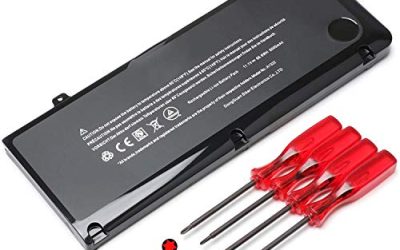
A32-N56 56Wh Replacement Battery (N46V / N56V / N76V Series)
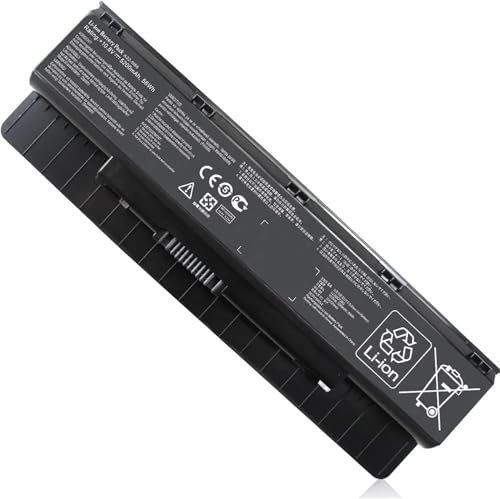
- Compatible part numbers: A31-N56, A32-N56, A33-N56, A32-N46
- Voltage: 10.8V
- Capacity: 56Wh (5200mAh), 6-cell Li-ion
- Certification: CE, FCC, RoHS
- Warranty: 12 months
- Compatible models include: N56JR, N56, N56D, N56DP, N56DY, N56J, N56JK, N56JN, N56V, N56VB, N56VJ, N56VM, N56VV, N56VZ, N46V, N76V, and N76VZ
This is the most direct match for the N56JR in this guide. It replaces the A32-N56 outright, and its compatibility list names the N56JR explicitly rather than leaving you to infer the fit from the wider N56 family. The 56Wh capacity equals the standard rating for this battery family, so it restores the runtime the laptop was designed around instead of trading capacity for a lower specification. Six lithium-ion cells sit inside the standard housing, which means the pack drops into the existing bay and locks with the original latches.
The 10.8V rating matches the original battery, and the listing states the full set of interchangeable part numbers, which makes the pre-purchase check simple: if your old pack says A31-N56, A32-N56, A33-N56, or A32-N46, this one is built for your laptop. CE, FCC, and RoHS certification is stated for the pack, and the listing describes built-in protection circuitry, which is what you want standing between the cells and the laptop. A 12-month warranty and a 30-day refund window give a reasonable safety net while the battery proves itself over its first weeks of use.
In everyday terms, this is the pack to choose if you want the closest thing to the original battery without paying for an official ASUS service part. It suits owners who use the N56JR as a daily machine for browsing, documents, and media, and who want the laptop to be portable again rather than tethered to a charger. One honest caveat: as with every third-party battery, verify the part number on your own original pack before ordering, and inspect the replacement on arrival to confirm the label, connector position, and housing shape match the battery you removed. Verification note: the Amazon product page for this ASIN returned an access error when read directly, so availability is confirmed through the linking retail roundup that lists this exact ASIN with its full specifications; no live stock confirmation was possible at the time of writing.
What to Check Before You Buy
Start with the label on your original battery. Confirm the part number, the voltage, and the capacity, then confirm the replacement lists the same part number and a matching voltage. Next, confirm that the N56JR appears in the compatibility list by name, and that the connector position and housing shape in the product photos match your old pack. Batteries in this family are keyed to a specific bay, so a pack for a different ASUS series may look close while refusing to seat properly.
Inspect the listing for certification marks and a stated warranty, and prefer a 12-month warranty over a shorter one. When the battery arrives, check the label before installing it: the part number, voltage, and capacity should match what you ordered, and the casing should be free of swelling, dents, or loose parts. If anything looks wrong, do not install it; contact the seller instead. Dispose of the old battery through a local battery recycling point rather than household waste, because lithium-ion packs need proper handling. Keep the old battery away from heat and puncture damage while you wait to recycle it.
Installation is a simple swap on the N56JR. Power the laptop down fully, unplug the charger, and remove all peripherals. Slide the battery release latches on the underside, lift the old pack out, and set the new one in place until the latches click. Charge the new battery fully before the first unplugged session, and let the laptop complete two or three full charge cycles before judging its runtime. Avoid leaving the laptop in a hot car or in direct sun, and store a spare battery at a partial charge in a cool, dry place if you keep one on hand.
FAQ
Which battery model does the ASUS N56JR use?
The N56JR uses the A32-N56 battery, and the interchangeable part numbers are A31-N56, A33-N56, and A32-N46. Check the label on your original battery to confirm which of those numbers it carries, then choose a replacement that lists the same number. The standard specification is 10.8V and 56Wh (5200mAh) in a six-cell lithium-ion pack.
Is a 48Wh battery okay for the N56JR?
A 48Wh (4400mAh) pack built for the same part-number family will fit and work, but it holds less energy than the standard 56Wh pack, so unplugged runtime will be shorter. If the 56Wh option is available, it is the better choice for restoring the laptop to its original runtime. The 48Wh pack is a reasonable fallback only when the full-capacity version is unavailable.
Will a replacement battery work without any setup?
Yes, in almost every case. The N56JR recognises a compatible replacement battery as soon as it is installed, with no driver or software setup needed. Charge it fully first, then let it run through two or three complete charge cycles so the battery gauge calibrates. If Windows reports the battery as unknown after a full charge, remove the pack, check the contacts are clean, and reseat it firmly.
How long should a new N56JR battery last?
A quality replacement should hold useful capacity for several hundred charge cycles, which for typical use means a few years of service before runtime shortens noticeably. Heat is the main factor that shortens battery life, so keep the laptop ventilated, avoid charging it on soft surfaces that block airflow, and avoid leaving it fully charged in a hot room for long periods. When runtime eventually drops to a level that interrupts your work, that is the sign to replace the pack again.
Is it safe to use a third-party battery in the N56JR?
A third-party battery is safe to use when it matches the correct part number and voltage, carries CE, FCC, and RoHS certification, and includes protection circuitry. Buy from a seller that states the warranty clearly and check the pack on arrival for damage or swelling. Avoid unbranded packs with no certification marks and no warranty, and never install a battery that is swollen, dented, or smells unusual.
Bottom Line
The best battery replacement for ASUS N56JR owners is a 56Wh A32-N56 pack that lists the N56JR by name and matches the original 10.8V rating. The A32-N56 56Wh battery in this guide meets those requirements directly, with the full set of interchangeable part numbers, stated safety certification, and a 12-month warranty. Confirm your original part number, match the voltage, and inspect the new pack before installation, and the N56JR will be portable again. If you only remember one rule, make it this: the part number decides the fit, and everything else follows from there.
Disclosure: As an Amazon Associate, we may earn from qualifying purchases.