Key takeaways
- Find the best 3rd party MacBook Pro 12 13 battery replacement, with A1322 and A1382 picks, fitment checks, capacity notes, and install tips for 2012 models.
Finding the best 3rd party macbook pro 12 13 battery replacement starts with decoding the keyword itself, because Apple never sold a single battery that fits every MacBook Pro from those two years. In this guide, “12 13” means the 2012 and 2013 MacBook Pro generations, and the two batteries that matter most are the A1322 for the 13-inch non-Retina unibody model and the A1382 for the 15-inch non-Retina unibody model. If your machine is a unibody laptop, a third-party battery can bring it back to portable use. If it is a Retina model, the batteries below do not fit.
Quick answer: For the 13-inch Mid 2012 MacBook Pro, the CSEXCEL A1322 is the strongest all-round pick, with the EGOWAY A1322 close behind. For the 15-inch Mid 2012 MacBook Pro, the Fancy Buying A1382 is the pick to look at first. Every battery in this guide is a third-party replacement sold on Amazon US, and every one is tied to a specific battery model number, so match that number to your own machine before you buy.
Quick Picks
| Battery | Fits | Capacity | Voltage | ASIN |
|---|---|---|---|---|
| CSEXCEL A1322 | 13-inch MacBook Pro, Mid 2009 to Mid 2012 | 6000mAh, 65Wh | 10.95V | B0CRKPK5N1 |
| Fancy Buying A1382 | 15-inch MacBook Pro, Early 2011 to Mid 2012 | 77.5Wh | 10.95V | B0BFQXGY72 |
| EGOWAY A1322 | 13-inch MacBook Pro, Mid 2009 to Mid 2012 | 6000mAh, 65Wh | 10.95V | B07DCRSG31 |
| Syfrufo A1322 | 13-inch MacBook Pro, Mid 2009 to Mid 2012 | 6000mAh, 66.6Wh | 11.1V | B07BKPSD4J |
How to Choose
Match the battery model number first
The battery model number is the one detail that decides fitment. Open the Apple menu, choose About This Mac, then System Report, and check the model identifier and the battery information. Then turn the laptop over and read the model number printed on the bottom case. A 13-inch unibody MacBook Pro takes an A1322 battery, and a 15-inch unibody MacBook Pro from the same era takes an A1382 battery. The old battery itself also carries its part number, such as 661-5229 or 661-5557 for the A1322, and 661-5844 for the A1382. If the number on your old battery does not match the listing, keep looking.
13-inch and 15-inch batteries are not interchangeable
The A1322 and the A1382 look similar in photos, but they are different physical parts with different connectors, different screw positions, and different capacities. The 13-inch battery is rated around 63.5 to 65Wh, while the 15-inch battery is rated at 77.5Wh. Ordering the wrong size is the most common mistake with these machines, and it is easy to make, because many listings mention both screen sizes in their compatibility text. Read the battery model number in the listing title, not the general description, and confirm that the listing names your exact MacBook Pro model identifier, such as MacBookPro9,2 for the 13-inch Mid 2012 machine or MacBookPro9,1 for the 15-inch Mid 2012 machine.
Understand what “12 13” really covers
The shorthand “12 13” in this keyword points at the 2012 and 2013 MacBook Pro generations, but the hardware changed between those years in a way that matters for batteries. The non-Retina unibody MacBook Pro reached its final form in mid 2012, and Apple did not release a non-Retina unibody model in 2013. The 2013 machines were Retina models, and Retina MacBook Pros use different batteries that are glued into the top case. The 15-inch Retina from Mid 2012 and Early 2013, for example, uses the A1417 battery, not the A1382. So if your laptop is a 2013 Retina MacBook Pro, none of the four batteries below will fit it. If your laptop is a 2012 non-Retina unibody machine, the A1322 and A1382 picks below are the correct parts.
Check capacity and voltage against the original
A replacement battery should match the original battery’s voltage and come close to its watt-hour rating. The original A1322 is a 10.95V, 63.5Wh pack, and the original A1382 is a 10.95V, 77.5Wh pack. Most third-party A1322 batteries are listed between 63.5Wh and 66.6Wh, and most third-party A1382 batteries are listed at 77.5Wh or a little above. A slightly higher watt-hour figure is normal for an aftermarket pack, but a dramatically higher claim deserves a second look. Voltage matters more than capacity: a pack listed at 10.95V matches the original design, while a pack listed at 11.1V, like one of the options below, uses a slightly different nominal voltage figure on its spec sheet, so read the listing carefully and confirm that it names your model before ordering.
Look at cycle life and cell quality
Third-party batteries for a laptop this old vary more in longevity than in first-day runtime. A new pack should arrive holding a full charge, report a cycle count of zero or one in System Report, and settle into normal use after a few full charge cycles. Listings often describe Grade A cells, built-in circuit protection, and protection against overcharging, over-discharging, and short circuits. Those features are worth looking for, because a lithium-polymer pack lives inside a machine you may leave charging overnight. A pack that swells, runs hot, or fades quickly in its first weeks should go back under the seller’s return window.
Weigh warranty, tools, and seller support
Because these are aftermarket parts for machines Apple classifies as obsolete, the seller’s warranty is your practical safety net. Most of the batteries in this guide carry a 12-month warranty, and several include a 30-day refund window. Several also ship with the small screwdrivers needed for the swap, which matters, because the unibody MacBook Pro uses tiny screws that a normal screwdriver set will not fit. Check whether the listing includes tools, whether the seller answers compatibility questions, and how returns are handled. A seller that states the exact models and part numbers covered, and that responds to fitment questions, is a better bet than a listing that only says the battery fits all MacBook Pro models.
The Best 3rd Party MacBook Pro 12 13 Battery Replacement Reviewed
CSEXCEL A1322 Battery for MacBook Pro 13-Inch
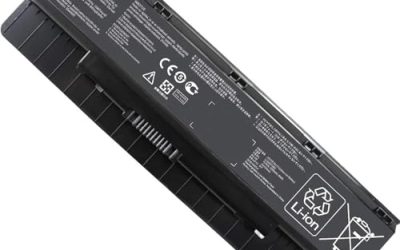
The CSEXCEL A1322 is the most straightforward pick for the 13-inch Mid 2012 MacBook Pro, and it leads this guide for that reason. It is listed at 6000mAh and 65Wh at 10.95V, which sits just above the original 63.5Wh rating, and it uses a 6-cell lithium-polymer design. The listing names the A1322 and A1278 battery model numbers and covers the 13-inch unibody MacBook Pro from Mid 2009 through Mid 2012, including the Mid 2012 machine identified as MacBookPro9,2. What makes this one stand out is the combination of a clear spec sheet and a 12-month warranty with a 30-day refund window. The listing states CE and FCC certification and built-in circuit protection, and it includes the screwdrivers needed for the swap. Installation on the unibody 13-inch machine is a manageable job: remove the bottom case, disconnect the old battery, remove its screws, fit the new pack in the same position, and reconnect. One caution applies to every A1322 battery, including this one: it does not fit the 2008 aluminum MacBook that also carries the A1278 enclosure number, and it does not fit any Retina model. Confirm the Mid 2012 date in About This Mac before ordering.
Fancy Buying A1382 Battery for MacBook Pro 15-Inch
The Fancy Buying A1382 is the pick for the 15-inch side of this keyword, and it is the only 15-inch battery in this guide, because the 15-inch unibody machine takes a different pack from the 13-inch machine. It is listed at 77.5Wh and 10.95V, matching the original A1382 rating, and it is built for the 15-inch MacBook Pro with a Core i7 processor from Early 2011, Late 2011, and Mid 2012. The listing names the A1286 enclosure, the MacBookPro8,2 and MacBookPro9,1 model identifiers, and part numbers including 661-5844, MC721LL/A, MC723LL/A, MD103LL/A, and MD104LL/A, which makes fitment unusually easy to confirm.
The fitment limits here are strict, and they deserve attention. This battery fits only the Core i7 versions of the 15-inch unibody MacBook Pro from Early 2011 through Mid 2012. It does not fit the 15-inch unibody machines from Mid 2009 and 2010, which use the A1321 battery instead, and it does not fit the 15-inch Retina models, which use the A1417 battery. If your 15-inch machine is a Mid 2012 model, check that the model identifier is MacBookPro9,1 and that the old battery is marked A1382. When those two details line up, this is a direct replacement with the same capacity rating as the original pack.
EGOWAY A1322 Battery for MacBook Pro 13-Inch
The EGOWAY A1322 is a solid second option for the 13-inch Mid 2012 MacBook Pro, and it earns its place here because it has a documented history with this exact machine. It was the battery used in a published step-by-step replacement on a 2012 MacBook Pro, where it was fitted in about ten minutes and was recognised by the system with a cycle count of one. It is listed at 6000mAh and 65Wh at 10.95V, matching the CSEXCEL pack on capacity and voltage, and it carries a 12-month warranty.
The compatibility picture is the same as for other A1322 packs: it fits the 13-inch unibody MacBook Pro from Mid 2009 through Mid 2012, covering the Mid 2012 machine and the earlier generations that share the A1322 battery. It does not fit the 2008 model, and it does not fit Retina machines. If the CSEXCEL listing is unavailable when you order, the EGOWAY pack is a like-for-like substitute with the same capacity, the same voltage, and the same fitment range. As with any third-party pack, check the cycle count in System Report after the first charge, and run a few full charge cycles before judging how long it lasts.
Syfrufo A1322 Battery for MacBook Pro 13-Inch

The Syfrufo A1322 rounds out the 13-inch options, and it is the one pick in this guide with a specification that needs a closer look. It is listed at 6000mAh and 66.6Wh with a nominal voltage of 11.1V, where the other A1322 packs in this guide are listed at 10.95V. That 11.1V figure is a different nominal voltage rating on the spec sheet, and it is the reason to read this listing with extra care. The listing states compatibility with the 13-inch MacBook Pro from Mid 2009 through Mid 2012, including the Mid 2012 machine, and it names the A1322 and A1278 battery model numbers along with part numbers 661-5229, 661-5557, 020-6547-A, and 020-6765-A.
On the practical side, this is a 6-cell lithium-polymer pack, and the listing states that it fits MacBook Pro models 5,5, 7,1, 8,1, and 9,2, which covers the Mid 2012 machine. It also states clearly that it does not fit laptops made in 2008. The 66.6Wh capacity figure is slightly higher than the original 63.5Wh rating, which is common for aftermarket packs. Treat this battery as a workable option for the 13-inch Mid 2012 machine, with one condition: confirm the 11.1V rating and the compatibility list on the Amazon listing itself before ordering, and check that the system recognises the pack correctly after installation. If the voltage figure gives you pause, either of the 10.95V A1322 picks above is the more conservative choice.
What to Check Before You Buy
Before you order any battery in this guide, run through a short checklist that takes about five minutes and prevents most fitment mistakes. First, confirm the model identifier in About This Mac and System Report: MacBookPro9,2 means a 13-inch Mid 2012 unibody machine that takes an A1322, and MacBookPro9,1 means a 15-inch Mid 2012 unibody machine that takes an A1382. Second, read the battery model number printed on the bottom case of your laptop, and if you have already removed the old battery, read the part number printed on it. Third, confirm that the listing names your model identifier and your battery part number, not just a screen size and a year.
Fourth, check the condition of the rest of the machine. A battery swap makes sense when the laptop still runs well on mains power and the only problem is a dead or swollen battery. If the machine has other faults, such as a failing hard drive cable or a damaged charging port, fix those first or weigh whether the repair is worth it. Fifth, look at the return window and the warranty, and test the new battery promptly after it arrives. Check the cycle count in System Report, charge it fully, and use it on battery power for a few days. A new pack that arrives with a high cycle count, that will not charge, or that swells should go back to the seller right away.
Finally, handle the old battery safely. A swollen lithium-polymer battery is a fire risk, so do not puncture it, bend it, or throw it in household waste. Keep it in a fire-safe spot away from flammable material, and take it to a battery recycling point or an electronics recycling service. Many local recycling programs accept laptop batteries, and some electronics retailers run collection schemes. Safe disposal is part of the job, not an afterthought.
FAQ
Does the A1322 battery fit the 2013 MacBook Pro?
No, not if the 2013 machine is a Retina model, and every 13-inch and 15-inch MacBook Pro sold in 2013 was a Retina model. The A1322 fits the 13-inch non-Retina unibody MacBook Pro from Mid 2009 through Mid 2012. A 2013 Retina MacBook Pro uses a different battery that is glued into the top case, so it needs a Retina-specific replacement and a different repair process.
Does the A1382 battery fit the 2013 MacBook Pro?
No. The A1382 fits the 15-inch non-Retina unibody MacBook Pro with a Core i7 processor from Early 2011 through Mid 2012. The 15-inch Retina MacBook Pro from Mid 2012 and Early 2013 uses the A1417 battery instead, and the Late 2013 Retina model uses yet another battery. Check the model identifier first: MacBookPro9,1 is the unibody machine that takes the A1382.
How do I know whether my MacBook Pro is a unibody or a Retina model?
Open the Apple menu, choose About This Mac, and check the model name and year. A Mid 2012 non-Retina machine has an optical drive slot on its right side and a removable bottom case held in with small screws. A Retina machine has no optical drive, is noticeably thinner, and has its battery glued in place. The model identifier settles it: MacBookPro9,2 and MacBookPro9,1 are unibody machines, while MacBookPro10,1 and MacBookPro10,2 are Retina machines from the same period.
How long does it take to replace the battery?
On the unibody 13-inch and 15-inch machines, the swap is a short job once the right tools are on hand. Removing the bottom case, disconnecting the old battery, removing its screws, fitting the new pack, and reassembling usually takes between ten and thirty minutes. The Retina models are a different story, because the battery is glued in, and that job takes longer and carries more risk. If you are unsure, a repair shop can fit a unibody battery quickly.
Should I calibrate a new third-party battery?
Yes, in a simple sense. After installation, charge the new battery fully, then use the laptop on battery power until it runs down to a low level, and charge it fully again. Repeat that cycle two or three times over the first week. This helps the system learn the pack’s capacity and gives a realistic picture of how long it lasts. Check the cycle count in System Report during that first week, and contact the seller if anything looks wrong.
Bottom Line
The best 3rd party macbook pro 12 13 battery replacement depends on which machine you actually own, and the battery model number is the detail that decides it. For the 13-inch Mid 2012 unibody MacBook Pro, the CSEXCEL A1322 is the strongest all-round pick, with the EGOWAY A1322 as a close substitute and the Syfrufo A1322 as a workable option if you confirm its 11.1V rating on the listing first. For the 15-inch Mid 2012 unibody MacBook Pro, the Fancy Buying A1382 is the pick, as long as your machine is a Core i7 model from Early 2011 through Mid 2012. If your laptop is a 2013 Retina model, none of these batteries fit, and a Retina-specific replacement is the right search instead. Confirm the model identifier, match the battery part number, and test the new pack promptly.
Disclosure: As an Amazon Associate, we may earn from qualifying purchases.