Our Short List of 3

- Best for: Hybrid workers who carry their headset between desks, rooms and travel.
- Bluetooth 5.2 with multipoint pairing to two devices at once
- Hybrid active noise cancellation
- Foldable design; weighs about 136 g
- Up to 20 hours of talk time; up to 21 hours of music with ANC on

- Best for: People who take calls all day from one desk and want a headset that lives on a charging stand.
- Bluetooth 5.2 with included BT700 USB Bluetooth adapter
- Up to 24 hours of talk time
- Wireless range up to 50 m with the adapter
- Noise-canceling dual microphone with Acoustic Fence technology
- Best for: Home offices that want ANC and a boom mic without buying an enterprise headset.
- Six-microphone array with AI noise reduction on a boom with busylight
- Hybrid active noise cancellation
- Up to 24 hours of talk time
- Bluetooth 5.0 with included USB dongle
All 3 Picks at a Glance
| Product | Specs | Action |
|---|---|---|
| Jabra Evolve2 65 Flex |
| Check price on Amazon |
| Poly Voyager 4320 UC |
| Check price on Amazon |
| Anker PowerConf H700 |
| Check price on Amazon |
Key takeaways
- The 4 best Bluetooth headsets for PC in November 2026, compared on mic clarity, PC connection, battery life and comfort for calls, classes and meetings.
A Bluetooth headset for a PC has a harder job than headphones made for a phone. It has to keep your voice clear while the PC fan hums, the keyboard clatters and the room around you stays busy. The microphone matters as much as the speakers, and the way the headset connects to the computer matters as much as the Bluetooth version printed on the box. A model that sounds fine for music can still leave callers asking you to repeat yourself, and that is the difference this guide is built around.
This guide is for people who spend the working day on a PC: remote workers on video calls, students in online classes, and anyone who wants one headset for meetings, music and the occasional game. Every pick below is a Bluetooth headset with a microphone that works with a PC, chosen from the name and specifications on its Amazon listing, so you can check each claim on the product page before you buy.
Quick Picks
As an Amazon Associate we earn from qualifying purchases.
| Product | Best for | Key spec from title |
|---|---|---|
| Jabra Evolve2 65 Flex | Hybrid workers who move between desks and travel | Foldable design, hybrid ANC, Bluetooth 5.2, up to 20 hours of talk time |
| Logitech Zone Vibe 100 | Everyday video calls on a PC with built-in Bluetooth | Flip-to-mute boom mic, multipoint Bluetooth, up to 20 hours of battery life |
| Poly Voyager 4320 UC | Long call days with a dedicated desk setup | BT700 USB adapter, up to 24 hours of talk time, up to 50 m wireless range |
| Anker PowerConf H700 | Home offices that want ANC and a boom mic without an enterprise headset | 6-mic AI noise reduction, hybrid ANC, USB dongle, multipoint pairing |
How to Choose
The microphone decides call quality
Speakers decide how good the other person sounds to you, but the microphone decides how good you sound to them, and on work calls the second half matters more. Look for a boom microphone that sits close to your mouth, or a microphone array that names its noise reduction, because a mic buried in an earcup picks up the room as loudly as your voice. A flip-to-mute boom is worth having: lifting the boom to mute is faster than hunting for a button mid-sentence. If you call from a shared room, a headset that filters background noise at the microphone keeps keyboard clicks and nearby conversation out of the call.
The PC connection matters as much as Bluetooth
Most modern PCs have Bluetooth built in, but a headset paired straight to a laptop does not always behave the way the box suggests. During calls, native Bluetooth can drop music audio to a lower-quality hands-free mode, and some laptops struggle to hold a steady link across a room. A headset that ships with its own USB Bluetooth adapter gives the PC a dedicated connection, which usually means steadier audio and fewer dropouts. Before ordering, check whether the adapter is USB-A or USB-C and match it to a free port on your machine, since the two variants look identical in a listing photo.
Match battery life to your call load
Headset makers quote two different battery figures, and the one that matters is talk time, not music time. A headset rated for 30 hours of music may only manage 20 hours of calls, because the microphone and the call audio profile draw more power. Count the hours you actually spend on calls in a heavy day, then add a margin for the days that run long. All four headsets here clear a full working day of calls on one charge, but if you regularly run back-to-back meetings, the longer talk time of the Poly and the quick top-up over USB-C matter more than a headline music figure.
Comfort decides whether you keep wearing it
A headset that hurts after two hours will sit in a drawer, however good its microphone is. Weight is the simplest guide: the lightest pick here is around 136 grams, and every extra gram presses on the top of your head through a long afternoon. On-ear cushions feel cooler and lighter but press on the ears, while over-ear cushions spread the pressure and block more room noise. Check the headband padding and whether the earcups adjust, and remember that a foldable design also matters if the headset travels with you between home and the office.
The 4 Best Options
Jabra Evolve2 65 Flex
- Best for: Hybrid workers who carry their headset between desks, rooms and travel.
- Bluetooth 5.2 with multipoint pairing to two devices at once
- Hybrid active noise cancellation
- Foldable design; weighs about 136 g
- Up to 20 hours of talk time; up to 21 hours of music with ANC on
Hybrid workers who carry their headset between desks, rooms and travel.
The on-ear fit presses on the ears rather than around them, so check the fit if you wear glasses; also confirm whether the box holds the USB-A or USB-C adapter version.
The Evolve2 65 Flex is the pick for people whose office moves with them. It folds down small enough to fit in a bag, weighs about 136 grams, and still carries hybrid active noise cancellation and a microphone system built for calls rather than music. It connects to two devices at once, so a call on the laptop and audio from a phone can share the same headset without re-pairing, and the included USB adapter gives a PC a dedicated link. The Microsoft Teams certification means the call controls behave the way Teams users expect.
Watch out for: The on-ear fit presses on the ears rather than around them, so check the fit if you wear glasses; also confirm whether the box holds the USB-A or USB-C adapter version.
Logitech Zone Vibe 100
The Zone Vibe 100 is the straightforward choice for everyday video calls on a PC that already has Bluetooth. It is an over-ear headset with a noise-canceling microphone on a boom that flips up to mute, which is the fastest mute control there is when a call goes off script. Multipoint Bluetooth keeps it paired to a computer and a phone at the same time, and it works with Teams, Google Meet and Zoom without extra software. With up to 20 hours of battery life, it covers a working day of calls and music without a midday charge.
Specs
- Over-ear design with a noise-canceling microphone on a flip-to-mute boom
- Multipoint Bluetooth pairing
- Up to 20 hours of battery life
- Works with Microsoft Teams, Google Meet and Zoom
- Built for Mac and PC
Best for: People who want a simple Bluetooth headset for daily video calls on a PC with built-in Bluetooth.
Watch out for: No USB receiver is included, so the PC needs its own Bluetooth; there is also no active noise cancellation, so room noise reaches your ears even though the mic filters it for callers.
Poly Voyager 4320 UC
- Best for: People who take calls all day from one desk and want a headset that lives on a charging stand.
- Bluetooth 5.2 with included BT700 USB Bluetooth adapter
- Up to 24 hours of talk time
- Wireless range up to 50 m with the adapter
- Noise-canceling dual microphone with Acoustic Fence technology
People who take calls all day from one desk and want a headset that lives on a charging stand.
The adapter comes in USB-A and USB-C versions that look alike in listings, so check which one the box holds; the charging stand also takes up permanent desk space.
The Voyager 4320 UC is built for long call days at a fixed desk. Its headline figures are the practical ones: up to 24 hours of talk time, a wireless range of up to 50 metres from the included BT700 USB adapter, and a charging stand that keeps the headset topped up between calls. The dual microphone uses Acoustic Fence noise reduction to keep background sound out of your voice, and the headset works with Teams and Zoom. It can also run as a corded headset over USB, which is a useful fallback when the battery runs low mid-call.
Watch out for: The adapter comes in USB-A and USB-C versions that look alike in listings, so check which one the box holds; the charging stand also takes up permanent desk space.
Anker PowerConf H700
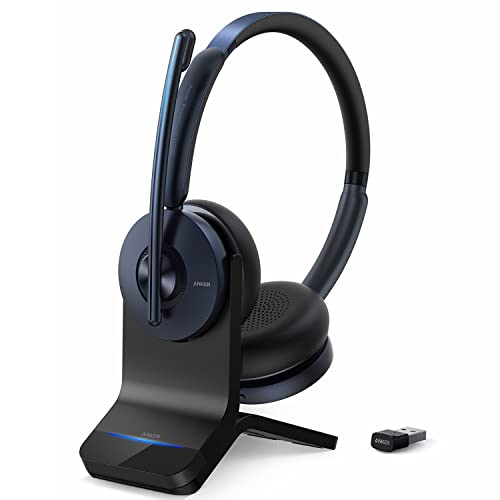
- Best for: Home offices that want ANC and a boom mic without buying an enterprise headset.
- Six-microphone array with AI noise reduction on a boom with busylight
- Hybrid active noise cancellation
- Up to 24 hours of talk time
- Bluetooth 5.0 with included USB dongle
Home offices that want ANC and a boom mic without buying an enterprise headset.
It is compatible with Teams and Zoom but carries no platform certification, so call controls may behave differently; some extra features need the companion app, which a managed work laptop may not allow.
The PowerConf H700 packs the two features people usually pay enterprise brands for, a boom microphone and active noise cancellation, into a headset aimed at home offices. Its six-microphone array uses AI noise reduction to clean up your voice, and the boom carries a busylight that tells housemates you are on a call. Multipoint pairing keeps it connected to a laptop and a phone, and the included USB dongle gives the PC a steadier link than native Bluetooth alone. A charging stand version exists, so check which version a listing describes before ordering.
Watch out for: It is compatible with Teams and Zoom but carries no platform certification, so call controls may behave differently; some extra features need the companion app, which a managed work laptop may not allow.
Which One Fits Your Situation
You take calls all day from one desk
Pick the Poly Voyager 4320 UC. Its 24 hours of talk time covers the longest call days, the charging stand keeps it ready between meetings, and the 50-metre range means you can step away from the desk without dropping the call. The corded USB fallback is there for the day the battery runs out mid-sentence.
You work from home, the office and anywhere in between
Pick the Jabra Evolve2 65 Flex. It folds flat for a bag, weighs about 136 grams, and its hybrid noise cancellation helps in shared spaces. Multipoint pairing and the included USB adapter make moving between a laptop and a phone painless, and the Teams certification keeps call controls predictable on any work laptop.
You want the simplest setup for daily video calls
Pick the Logitech Zone Vibe 100. If your PC has Bluetooth, there is nothing to plug in: pair it once and the flip-to-mute boom handles the rest. It works with the main meeting platforms, and 20 hours of battery covers a working day without thinking about charging, while the over-ear cushions stay comfortable through long calls.
You want ANC and a boom mic for a home office
Pick the Anker PowerConf H700. It combines hybrid noise cancellation with a six-microphone boom and a busylight, which is the combination that keeps both sides of a call quiet. Just remember it is compatible with Teams and Zoom rather than certified, so check that your setup does not need certification.
Common Mistakes
- Buying music headphones with a built-in mic and expecting call quality from a headset: the mic placement and noise handling are different jobs.
- Pairing over native PC Bluetooth and judging the headset by the drop in music quality during calls: the hands-free profile is the cause, and a USB adapter usually avoids it.
- Ordering the wrong USB adapter version: USB-A and USB-C variants of the same headset look identical in photos, so check the listing details.
- Comparing battery figures across brands without checking whether the number is talk time or music time: talk time is the figure that decides whether a headset survives your call load.
- Skipping the platform check: if work runs on Teams, a certified headset behaves more predictably than one that is merely compatible.
Frequently Asked Questions
Do Bluetooth headsets work with any PC?
Most do, but the connection is the detail to check. A PC with Bluetooth can pair directly, while a PC without it needs the headset’s USB adapter. Headsets that include an adapter, like the Jabra, Poly and Anker picks here, cover both cases, while the Logitech Zone Vibe 100 relies on the PC’s own Bluetooth.
Why does music sound worse during a call?
When a call starts, Bluetooth switches to a hands-free profile that carries your voice both ways, and that profile has less bandwidth for music. It is normal behaviour, not a fault. Using the headset’s USB adapter instead of native Bluetooth usually keeps the switch cleaner, and the sound returns to normal when the call ends.
Is a USB adapter better than built-in Bluetooth?
For calls, usually yes. The adapter gives the headset a dedicated link to the PC, which means a steadier connection, fewer dropouts and more predictable call controls. Built-in Bluetooth works fine for many people, but if calls drop or the audio stutters, the adapter is the first thing to try before blaming the headset.
Can one headset handle calls, music and games?
Yes, with a limit. All four picks here play music and handle calls, and multipoint pairing lets them stay connected to two devices. Games are the exception: Bluetooth adds delay that matters in fast games, so competitive players should use the corded USB mode where the headset offers it, or a separate wired connection.